Each client signs in separately.
No shared practice password, no spreadsheet of generic credentials, and no need to give a client access to your own dashboard.
Practice client accounts
Practice plans let you connect separate IQ Suite workspaces for clients. Each client gets their own login, full workspace and one IQ Books organisation, with one-off starter credits. Your practice controls the connection limit, invitations, sponsorship and removal workflow.
The exact mechanics
The feature is deliberately simple: your practice can create and remove client accounts, but the client workspace is not a shared practice login. That keeps the commercial model and access model clear.
No shared practice password, no spreadsheet of generic credentials, and no need to give a client access to your own dashboard.
The client works in their own IQ Suite account with access to ReconcileIQ, CodeIQ and LedgerIQ.
Your practice login has its monthly allowance. Each connected client starts with 1,000 standard one-off credits and 2,500 bonus credits; neither refreshes automatically.
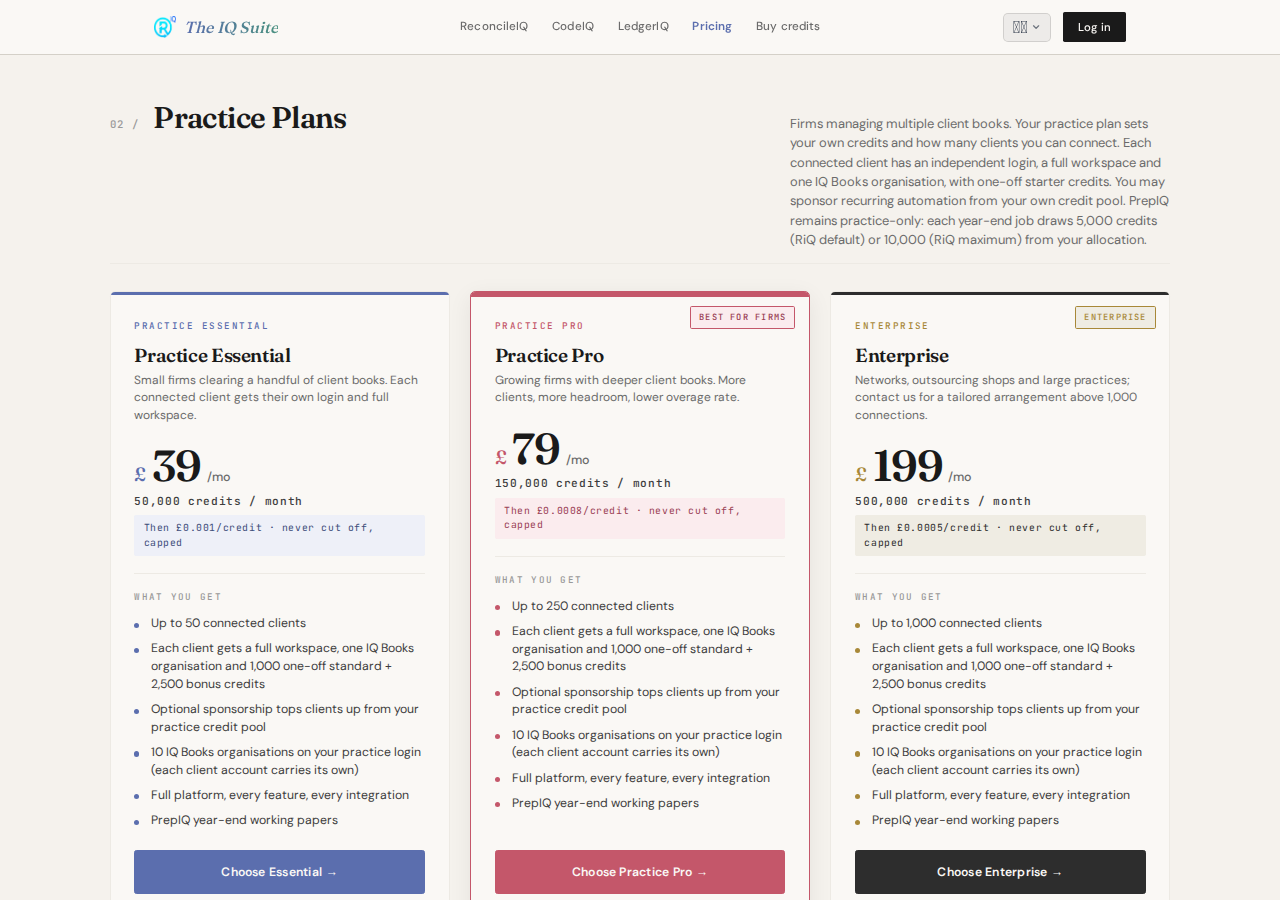
Practice Essential, Practice Pro and Enterprise differ by owner credits, overage rate and maximum client accounts.
Why this matters now
The feature is shaped by three current pressures on practices: client onboarding, rising digital expectations, and tighter access-control discipline around client data.
HMRC guidance says agents should sign up qualifying clients for 2026 to 2027 now, get client permission, and sign up each client separately through the online service.
Read GOV.UK agent guidanceICAEW describes rising client expectations, competition for talent, increasing compliance demands and digital innovation as forces reshaping practice technology foundations.
Read ICAEW practice technology guideThe ICO advises role-based access rights, regular access reviews and timely removal of leavers. ICAEW highlights confidentiality, secure storage and UK GDPR duties around client files.
Read ICO access guidancePractice workflow
Client accounts are not just a pricing perk. They are the account boundary that lets a practice gather files, keep client activity separate and avoid the bad habit of passing around one internal login.
Add one client by email or bulk-upload a list by CSV. The console tracks how many accounts are active against your plan limit.
Create secure upload links for invoices or bank statements so clients can send files into the workflow without touching your practice credentials.
The suite can reconcile, code, classify and analyse, but client account access does not replace engagement letters, HMRC agent authorisation or professional review.
Feature surface
The point is not a prettier address book. It is a cleaner operating model for recurring client bookkeeping, evidence gathering and client-side usage.
Provisioned clients can use ReconcileIQ, CodeIQ and LedgerIQ in their own account rather than waiting for the practice to run every small task manually.
The practice console shows client accounts, active status, pending logins and plan-limit usage so growth does not happen in a blind spot.
Bank statement and invoice upload links reduce email back-and-forth and avoid clients sending sensitive files to the wrong inbox thread.
Practice tiers do not gate features. They scale by monthly credits, overage rate and number of client accounts.
The boundary
Use them to avoid shared logins and create separate workspaces. Keep your normal engagement, authorisation, data-protection and professional review processes in place around them.
Practice plan limits
Every practice tier includes the full platform. The differences are monthly credits for the practice login, overage rate and maximum client accounts.
£39 / month
50,000 monthly practice credits and client-workspace capacity for a growing book.
£79 / month
150,000 monthly practice credits, wider connection capacity and a lower overage rate.
£199 / month
500,000 monthly practice credits and capacity for 1,000 connected clients; ask us about larger networks.
The practice login's monthly credits are not automatically pooled with clients. Each connected client has one-off starter credits. If you choose sponsorship, a top-up to the target you set is transferred from your practice pool; a client can instead subscribe independently and remain connected.
Questions practices ask
Client accounts are deliberately narrow in what they promise. They help with provisioning and access separation; they do not replace professional duties.
Yes. Connected clients can access ReconcileIQ, CodeIQ, LedgerIQ and one full IQ Books organisation. PrepIQ is practice-only.
Not automatically. The owner login has its own monthly credits. Clients begin with one-off credits, and a practice may choose to sponsor a target balance from its own pool.
The client-account workflow supports removal from the practice allocation. Your engagement and data-retention process should still follow your professional and legal obligations.
No. IQ Suite client accounts are product workspaces. HMRC agent authorisation and statutory filings remain separate.
Next step
Start with Essential for up to 50 connected clients, move to Pro for 250, or use Enterprise for up to 1,000. Larger networks can arrange a tailored plan.